Mobile App for VoIP - SNAPmobileUpdated 4 months ago
This article describes the SNAPmobile VoIP app which can be used instead of -- or in conjunction with -- a physical desk phone on the EngineWorks 5S® VoIP platform. SNAPmobile allows calls to be routed to both mobile and desk phones simultaneously, and leverages your cellular and/or Wi-Fi connections.
Setup
1. To load the app, go to App Store (iPhone) or Google Play Store (Android) and search for “SNAPmobile”
2. Once downloaded, open the app.
3. For the "Host ID", enter ucnet and click "Continue".

4. Enter your “Login Name”, which is your numeric extension followed by @yourdomainname.com. Then enter your password and click Log In.

If you don't know your Login Name, click Forgot login name, then enter the Host ID (ucnet) and the email address registered to your account.
If you don't know your password, click Forgot password and enter your login name (in the format of [email protected]).
4. Go to the main screen which lists all extensions on the system (including tenants).
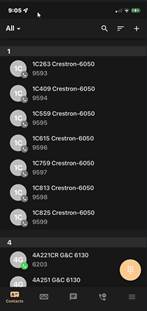
5. Options are at the bottom of the screen. Most options are self-explanatory, however, there is one more step that is needed to complete the setup, if you want call forwarding to your mobile phone.
a. Go to the Options menu

b. Select Settings
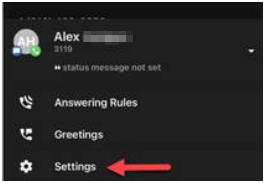
c. Add your mobile number to the settings, and when you get a call at your desk number, it will also ring your mobile device.
6. Additional tasks you can also use the app for:
- View contacts
- Listen to Voicemail
- Call History
- Answering Rules
- Greetings
- Settings
- Logout (use this if you don't want to receive desk phone calls, i.e., vacation, weekends, etc.)